Autoliiga Car Soccer Arcade Game
Reviews
💡Autoliiga turns soccer into a fun car game. The controls are straightforward, so you can jump into a match quickly. Playing against a friend adds replay value, and each goal feels satisfying. It is a clean, no-frills arcade experience that works well for quick breaks or longer play. The full screen option improves visibility. A solid choice for casual local multiplayer.
Description
Game Introduction
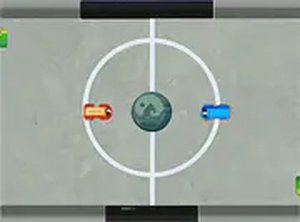
Autoliiga Car Soccer Online Arcade Game is a creative sports game that combines the thrill of driving with the strategy of soccer. Instead of controlling a player, you drive a car to hit the ball into the opponent's goal. This unique twist offers a fresh take on traditional soccer, making it perfect for friendly competition. The game is designed for two players and can be played for free directly in your browser on a desktop computer. Whether you want a quick match or a longer session, Autoliiga provides simple and enjoyable gameplay for all ages.
How to Play
To play Autoliiga, you need two players. Each player controls a car using the keyboard. Player 1 typically uses the W, A, S, D keys to move, while Player 2 uses the arrow keys. The objective is to drive your car into the ball and push it toward the opponent's goal. The field has goals on each side, and the player who scores more goals wins. The controls are easy to learn, so you can start playing right away. For the best experience, use a desktop computer with a keyboard. You can also switch to full screen mode for a better view.
Game Features
Autoliiga features car soccer gameplay in a two-player local mode. It is free to play and runs directly in your browser on desktop computers. The game offers a full screen option for an immersive experience. Simple keyboard controls make it easy to pick up and play. The focus on two-player competition makes it great for playing with a friend. The game is designed for quick, competitive matches that are fun for all ages.
Tips for Success
To succeed in Autoliiga, practice controlling your car to improve your accuracy when hitting the ball. Work on positioning yourself between the ball and your own goal to defend effectively. Communicate with your teammate if playing in a team mode, or learn to anticipate your opponent's moves in a head-to-head match. Use the full screen option for a better view of the field. Most importantly, have fun and enjoy the unique combination of driving and soccer.
Compatibility
Faq
Is Autoliiga available on mobile devices?
Does Autoliiga support online multiplayer?
Is there a single-player mode in Autoliiga?
What are the system requirements to play Autoliiga?
How do I switch to full screen mode in Autoliiga?
Can I customize the controls in Autoliiga?
Games You Might Enjoy
Crazy Golf Online Arcade
Crazy Golf Online Arcade
Goal Arcade Sports Game
Goal Arcade Sports Game
Touchdown American Football Arcade
Touchdown American Football Arcade
Table Tennis 2: Tournament Arcade
Table Tennis 2: Tournament Arcade

Nick Basketball Stars Arcade Game
Nick Basketball Stars Arcade Game
Stick Tennis Arcade Sports Game
Stick Tennis Arcade Sports Game
Soccer Face Arcade Sports
Soccer Face Arcade Sports

Wrestler Rush Arcade Sports Game
Wrestler Rush Arcade Sports Game
3D Air Hockey Online Arcade
3D Air Hockey Online Arcade