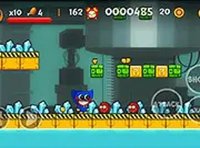
Monster Jump Arcade Adventure

Reviews
💡Monster Jump beta is a straightforward arcade platformer that delivers consistent fun. The coin collection and trap avoidance mechanics are easy to learn but offer enough challenge to keep you engaged. Levels introduce new obstacles at a good pace, encouraging replay to improve your jumps. The family-friendly design and smooth performance make it a reliable choice for short gaming sessions or longer play.
Description
Game Introduction
Monster Jump beta is a free online arcade platformer that puts you in control of friendly monsters. The core goal is to collect shiny coins scattered across each level while avoiding traps and obstacles. Each level introduces new challenges, requiring careful jumps from platform to platform. The game is designed for desktop browsers and runs smoothly without downloads. It offers a family-friendly experience with no violent or inappropriate content, making it suitable for players of all ages. Whether you have a few minutes or want a longer session, Monster Jump beta provides a straightforward and engaging challenge that tests your reflexes and planning skills.
How to Play
To play Monster Jump beta, use your keyboard or mouse on a desktop computer. Press the arrow keys or spacebar to make your monster jump from one platform to another. Your objective is to collect all coins in each level while steering clear of traps and obstacles. Some platforms may move or be unstable, so plan your jumps carefully. Reach the destination point without falling or hitting hazards to clear the level. The game is free to play and can be enjoyed in full screen mode for a more immersive experience. There are no complex instructions, making it easy for players of all skill levels to start playing immediately.
Game Features
Family-friendly platformer with coin collection mechanics. Multiple levels with increasing difficulty. Trap avoidance adds strategic depth. Simple keyboard and mouse controls. Smooth browser-based performance. Full screen mode available for better immersion. Free to play with no downloads required.
Tips for Success
Monster Jump beta offers a clean and accessible platforming experience. Its simple mechanics and gradual difficulty make it enjoyable for both casual players and platformer fans. The family-friendly design ensures safe fun for everyone.
✅ Compatibility & Testing
All games on this site are manually tested on: • Desktop (Windows 11, macOS Ventura) • Mobile (iPhone 14, Samsung Galaxy S23) • Tablet (iPad Pro, Android tablet) 📌 Supported browsers: Chrome, Safari, Edge, Firefox (latest versions) 📌 Not supported: Internet Explorer, older browser versions
Faq
Is Monster Jump beta free to play?
Can I play Monster Jump beta on mobile devices?
Are there different monsters to choose from?
Does the game have a time limit for each level?
What happens if I fall off a platform?
Is there a way to save my progress?
Games You Might Enjoy

SpongeBob CardBORED Action Card Game
SpongeBob CardBORED Action Card Game
Kogama Forest Parkour 3D Adventure
Kogama Forest Parkour 3D Adventure
Ultimate Obby Parkour Adventure - Online Obstacle Course Game Arcade Game
Ultimate Obby Parkour Adventure - Online Obstacle Course Game Arcade Game
Chicken Revenge Arcade Adventure
Chicken Revenge Arcade Adventure
Chicken Jockey: Penguin Rescue Adventure
Chicken Jockey: Penguin Rescue Adventure
Desierto Desert Exploration RPG
Desierto Desert Exploration RPG
Indi Cannon - Players Pack Physics Puzzle Online Game
Indi Cannon - Players Pack Physics Puzzle Online Game

Karenni Run Online Arcade Game
Karenni Run Online Arcade Game
Steppy Knight Online Game - Puzzle Action Game
Steppy Knight Online Game - Puzzle Action Game