
What players say
This tool makes animation accessible to everyone. The frame-by-frame approach is intuitive, and the preview feature helps you refine your work. It is perfect for beginners and quick projects, with no downloads needed. The only limitation is the lack of editing tools, but the simplicity is also its strength.
About this game
Game Introduction
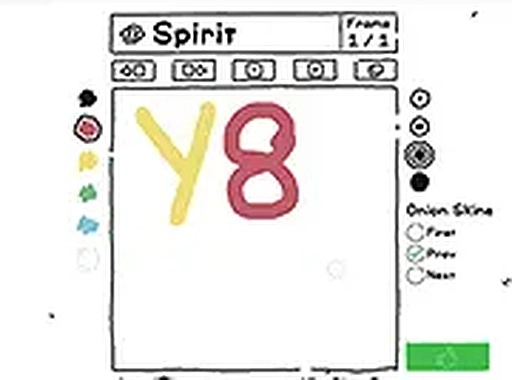
Animation Studio: GIF Creator Drawing Game is a browser-based tool that allows you to create animated GIFs from scratch. The core idea is simple: you draw each frame of your animation using a basic pencil tool on a clean canvas, then the tool combines those frames into a looping GIF. This makes animation accessible to anyone who wants to express ideas through motion, without needing complex software or prior experience. The tool is designed for quick creative projects and learning the basics of animation. It runs directly in your web browser, requiring no downloads or installations, so you can start creating immediately.
How to Play
To create an animation, you start by selecting the pencil tool and drawing on the canvas. Each drawing becomes one frame of your animation. You then add a new blank frame using the add frame button, and continue drawing the next frame in your sequence. You can preview the animation at any time to see how the frames flow together. When you are satisfied with your sequence, you save the result as a standard GIF file. The interface is designed to work best with a mouse or keyboard on a desktop computer, providing a responsive drawing experience.
Game Features
The tool includes a simple pencil tool for freehand drawing. An add frame button lets you build multi-frame sequences easily. A preview function shows your animation looping before you save it. Saving as a standard GIF file allows you to share your creation on social media or websites. The entire tool runs directly in your web browser, requiring no downloads or installations.
Tips for Success
Start with simple shapes and movements to get comfortable with the frame-by-frame process. Plan your animation sequence before you begin drawing to ensure smooth motion. Use the preview function frequently to check how your frames flow together. Experiment with different drawing styles and frame counts to see what works best for your idea. Practice regularly to improve your timing and drawing skills.




Player comments
Sign in to comment
You must be logged in before posting a review or rating.
No account? Create one
No comments yet. Be the first to comment!