Haunted School Survival Horror
Reviews
💡Haunted School offers a chilling atmosphere and engaging puzzles that challenge your survival skills. The jump scares are well-timed, and the ammo management adds strategic depth. It's a fun, family-friendly horror experience that tests your nerves without crossing any lines.
Description
Game Introduction
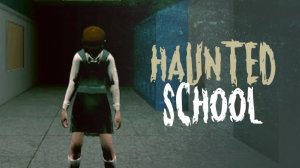
Haunted School Survival Horror is a tense horror game set within a spooky school environment. Players are placed in a chilling scenario where their primary goal is to find tools needed to exorcise a demonic child. The game emphasizes exploration, puzzle-solving, and a frightening atmosphere filled with jump scares. Inspired by classic survival horror titles, it challenges players to navigate the school while uncovering clues and managing limited resources. The experience focuses on building suspense and fear as you progress through the haunted halls.
How to Play
Players typically control their character using standard keyboard inputs such as WASD or arrow keys for movement. Interaction with objects and items is done via a designated action key. The game encourages careful resource management, as ammunition and supplies are scarce. Following in-game notes and clues is essential to understanding the story and finding your way through the school. A sprint function allows you to quickly evade threats, and you can pause the game at any time. The ultimate objective is to locate all necessary items and complete the exorcism ritual to escape the haunted school.
Game Features
The game includes jump scares that create sudden moments of tension. Puzzle-solving challenges your logic and observation skills. A tense survival horror atmosphere keeps you on edge throughout the experience. Exploration of a detailed school environment reveals hidden clues and supplies. Resource management requires careful planning of your limited ammunition and items. The game also features a compelling story that unfolds through notes and documents found in the environment.
Tips for Success
Always search thoroughly in every room for hidden supplies and clues. Manage your ammunition wisely, as replacements may be rare. Read all notes and documents carefully to understand the story and objectives. Save your progress whenever possible to avoid losing significant progress. Stay alert for audio cues that may indicate nearby dangers. Practice moving and interacting quickly to react effectively in tense moments. Patience and careful exploration are key to surviving the horrors of the school.
Compatibility
Faq
Is this game suitable for children?
What platforms is this game available on?
Does the game have a multiplayer mode?
How long does it take to complete the game?
Are there difficulty levels?
Can I save my progress anytime?
Games You Might Enjoy

Puppet Fighter 2 Player Action
Puppet Fighter 2 Player Action
Haunted School Survival Horror
Haunted School Survival Horror

Catch a Fish Obby Arcade
Catch a Fish Obby Arcade

Arcade Attack Online Game
Arcade Attack Online Game

Fish Grow Big Arcade Game
Fish Grow Big Arcade Game

Stickman City Arcade Adventure
Stickman City Arcade Adventure

Two Bike Stunts Arcade Game
Two Bike Stunts Arcade Game

Muscle Rush Arcade Runner
Muscle Rush Arcade Runner

Precision Target Challenge: Aim Master Arcade
Precision Target Challenge: Aim Master Arcade