Guess Word Online Puzzle Game
Reviews
💡Guess Word is a well-made word puzzle that is easy to pick up but offers enough challenge to keep you coming back. The color-coded feedback is intuitive and helps you improve with each guess. The game works perfectly on mobile and desktop, and the full screen mode adds to the experience. It is free, ad-free in gameplay, and suitable for all ages. A solid choice for word game fans.
Description
Game Introduction
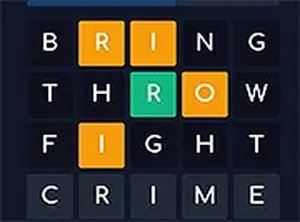
Guess Word is a simple yet challenging word puzzle game that tests your vocabulary and logical thinking. Each round presents a random five-letter target word. You have six chances to guess it correctly. After every guess, the game provides clear feedback: green means the letter is correct and in the right position, yellow means the letter is correct but misplaced, and gray means the letter is not in the word. This feedback helps you refine your next guess. The game is designed for quick play sessions, making it perfect for a short break or a longer challenge. It is completely free, works on both mobile and desktop browsers, and requires no downloads or installations. You can even use full screen mode for a more focused experience. Guess Word is suitable for all ages and offers endless fun for word lovers.
How to Play
To play Guess Word, start by typing any five-letter word into the input field. Press enter to submit your guess. The game then highlights each letter with a color: green for correct position, yellow for correct letter but wrong position, and gray for letters not in the word. Use this information to make smarter guesses. You have up to six attempts to find the target word. The game is easy to learn and does not require any special skills. Just think carefully and use the clues to solve the puzzle. You can play on your phone, tablet, or computer. The controls are simple and intuitive, making it accessible for everyone.
Game Features
Guess Word offers several features for a smooth experience. It is free to play with no hidden costs. No downloads or installations are needed. The game works on mobile devices and desktop computers. You can play in full screen mode for better focus. The interface is clean and family-friendly. Each game is quick, usually lasting a few minutes. The feedback system is clear and helpful.
Tips for Success
Guess Word is a great way to exercise your brain and learn new words. The game is relaxing yet engaging, making it ideal for short breaks or longer sessions. It is safe for all ages and provides a positive mental challenge.
Compatibility
Faq
Is Guess Word free to play?
Can I play Guess Word on my mobile phone?
Does Guess Word require an internet connection?
Is Guess Word suitable for children?
How long does a typical game of Guess Word take?
Can I play Guess Word in full screen mode?
Games You Might Enjoy
Minesweeper Challenge: Logic Puzzle
Minesweeper Challenge: Logic Puzzle

Lifespan Candle Puzzle
Lifespan Candle Puzzle
Swipe a Car Logic Puzzle
Swipe a Car Logic Puzzle
Guess Word Online Puzzle Game
Guess Word Online Puzzle Game
Polarity Switch Physics Puzzle
Polarity Switch Physics Puzzle

Happy Filled Glass Puzzle
Happy Filled Glass Puzzle
Math Miner Puzzle Game
Math Miner Puzzle Game

Snowy Day Escape Puzzle
Snowy Day Escape Puzzle